
By Rohit KumarAI Automation & Digital Growth ConsultantBuild Log
I didn’t build this because AI automation is fashionable. I built it because a simple business process was becoming repetitive: customers buy supplements, eventually need a refill, and somebody has to remember when to follow up, find the previous order, answer the customer and move the order to the next stage.
That is exactly the kind of process where automation makes sense. The objective was not to replace the business owner or turn every customer message into an AI conversation. The objective was much simpler: connect the repetitive parts of the refill journey so the business can spend more time dealing with customers and less time moving information between systems.
My rule while building this: Don’t use AI for a problem that a simple automation can solve.

The business problem I was trying to solve
A supplement store has a natural repeat-purchase cycle. Someone buys whey protein, creatine, a mass gainer or another product. At some point, that customer may need the same product again.
The difficult part isn’t sending one WhatsApp message. The difficult part is remembering the right customer, finding the previous order, understanding the reply, checking the order state, handling payment and keeping the business record updated.
When those steps are handled manually, the process becomes dependent on memory. As order volume grows, that creates unnecessary administrative work and increases the chance of missed follow-ups.
The question I asked was simple: How much of this journey can happen automatically while keeping the business owner in control when something requires a human decision?
What I actually built
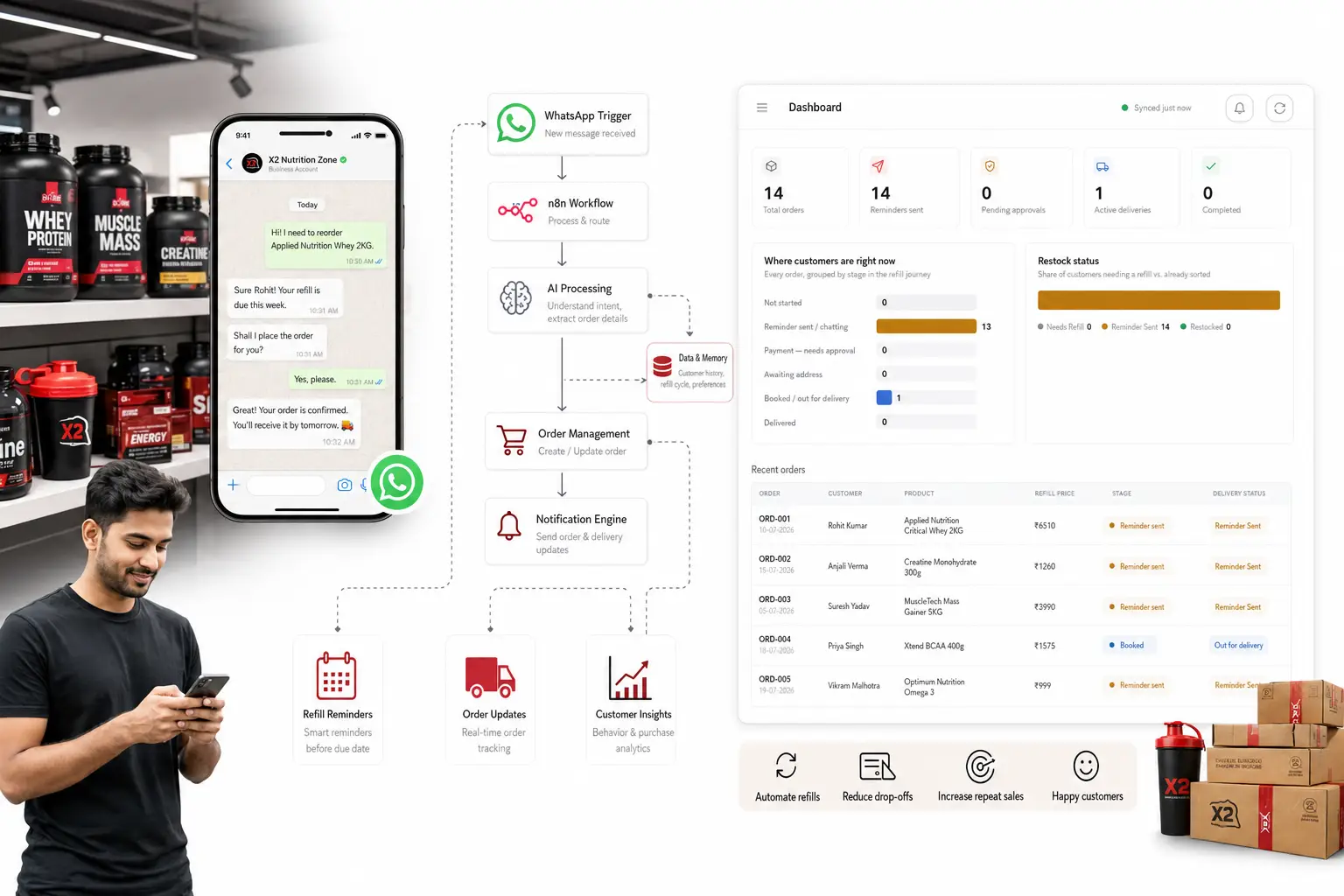
The system combines a customer/order dashboard with an automation layer. The workflow shown in the build uses webhooks, order data, WhatsApp, conditional logic, payment-related actions, AI-assisted message processing and status updates.
The dashboard gives the business a single operational view instead of forcing someone to inspect individual conversations and spreadsheets every time an order changes stage.
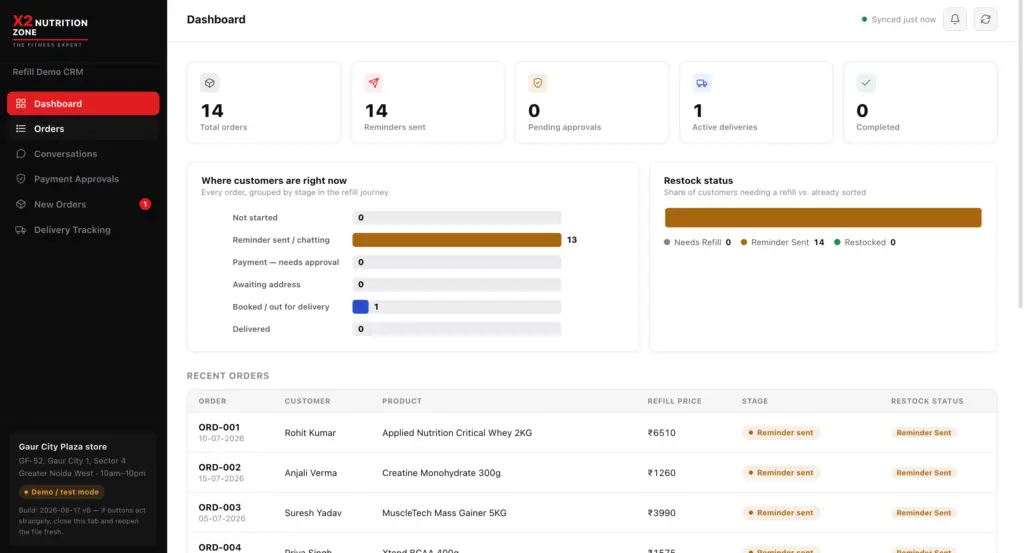
Dashboard from the demonstrated refill automation build. Customer information should be anonymized before public publication.
What the dashboard is actually tracking
The dashboard screenshot gives a useful view of the operational state of the system. In the demonstrated snapshot, it showed 14 total orders, 14 reminders sent, no pending approvals, one active delivery and no completed deliveries.
Thirteen orders were shown in the reminder/chatting stage, while one was shown as booked or out for delivery. The purpose of these numbers is to demonstrate the workflow state at the time of the snapshot — they are not being presented as business performance or revenue results.
14Orders in dashboard snapshot
14Reminders shown as sent
1Active delivery
0Pending payment approvals
The complete customer journey
Instead of treating WhatsApp, orders, payments and delivery as separate activities, the system connects them into a single workflow.
Previous Order
→
Refill Reminder
→
WhatsApp Reply
→
Order Lookup
→
Payment
→
Delivery
Where the automation starts
The workflow contains separate webhook-driven paths for different business events. A refill reminder can enter the system, be normalized into the expected data format, trigger a WhatsApp message and then update the corresponding order.
This is important because the workflow doesn’t need an AI model to decide everything. A scheduled reminder is a deterministic event. The system knows what it needs to do.
Automation principle #1 If the input and the required action are predictable, use rules and automation first.
Then WhatsApp becomes the interaction layer
The interesting part starts when the customer replies. A message coming from WhatsApp isn’t always structured like a database field. A customer might write:
Example: “Yes, send the same whey again.”
“I already paid. Please check.”
“Can you send it tomorrow?”
Those messages contain business intent, but the information isn’t necessarily formatted as a clean command. This is where an AI layer becomes useful.
AI is used where the input becomes messy
In the demonstrated workflow, an incoming WhatsApp message can be parsed, the relevant order can be identified, a prompt can be built and an AI-assisted response can be generated before the workflow continues.
That distinction matters. I don’t want to call every webhook an AI agent. Most of the system is ordinary automation — and that is a good thing.
| Business task | Best approach | Why |
|---|---|---|
| Find an order by phone | Automation | Deterministic lookup. |
| Check an order status | Automation | A database value should decide the result. |
| Send scheduled refill reminder | Automation | No AI reasoning is necessary. |
| Understand an unstructured customer reply | AI-assisted | Natural language contains variable intent. |
| Generate a natural response | AI-assisted | AI can turn structured information into a human-readable reply. |
| Update order status | Automation | The final state should be controlled by business logic. |
| Handle unusual or risky situations | Human review | Not every decision should be delegated to a model. |
How the payment workflow fits into the system
Payment is another point where the workflow branches. The demonstrated automation includes a payment approval path that reads order data, identifies the relevant order, makes a decision and then follows an approved or rejected branch.
There is also a WhatsApp path for payment-related customer messages. The workflow can identify whether a message contains a payment screenshot, build the relevant AI prompt and continue into the payment stage.
This is where business automation becomes more than a chatbot. The customer isn’t simply talking to an AI. The conversation is connected to an actual business record and an operational process.
The architecture behind the build
The original workflow contains several separate automation paths rather than one giant chain. That makes sense because a reminder, payment approval, booking confirmation and order reset are different business events.
Simplified architecture of the refill automation
WhatsApp Customer messages
Webhooks Business events
n8n Workflow orchestration
Order Data Customer & order records
AI Layer Unstructured message handling
Business Actions Payment, booking, delivery
What the n8n workflow is doing
The workflow screenshot shows several independent automation paths. The exact implementation can evolve, but the architecture can be understood in a few practical layers.
1. Reminder workflow
A reminder webhook enters the workflow, the payload is normalized, a reminder message is sent, and the relevant order is updated.
2. CRM feed
A separate feed path reads order information and builds a response. This provides the dashboard with current operational information.
3. Payment approval
The approval webhook reads the relevant order, finds the order by ID and branches into an approved or rejected path.
4. WhatsApp processing
An incoming WhatsApp event is parsed, checked for a usable message, matched against order data and routed through the relevant business logic.
5. AI-assisted conversation
When the message requires language understanding, the workflow builds a prompt, sends it to the AI layer, parses the response and continues according to the current order stage.
6. Booking and reset workflows
Separate webhook paths handle booking confirmation and order reset operations. Keeping these actions separate makes the system easier to reason about and debug.
What I intentionally did not automate with AI
One of the easiest mistakes in AI automation is putting an AI model in front of every decision.
That sounds impressive in a demo, but it can make a system more expensive, less predictable and harder to debug.
A simple rule works better here: Let code handle predictable state. Let AI handle language. Let humans handle important exceptions.
What I would improve next
The current build demonstrates the core workflow, but a production-grade automation system should continue evolving.
- Move critical operational data to a proper database as the system grows.
- Add stronger webhook idempotency so duplicate events cannot create duplicate actions.
- Add retry and failure handling for external API requests.
- Maintain an audit trail for important customer and payment events.
- Add AI confidence thresholds for ambiguous customer messages.
- Escalate sensitive or unclear conversations to a human.
- Track reminder → response → reorder as a measurable funnel.
- Connect delivery status to the same customer/order record.
- Separate demonstration data from production customer data.
- Add monitoring so failed workflows are visible before they become business problems.
The bigger opportunity isn’t the supplement store
This architecture can be adapted to many businesses. The exact workflow changes, but the principle stays the same: identify repetitive events, connect the business data, automate deterministic actions and use AI only where human language or interpretation creates friction.
| Business | Potential automation |
|---|---|
| Supplement store | Refill reminders, order status, payment conversations and repeat orders. |
| Gym | Membership renewal reminders, enquiries and follow-up. |
| Salon | Appointment reminders, rebooking and customer follow-up. |
| Clinic | Appointment communication and administrative workflows with appropriate human controls. |
| Local service business | Lead capture, qualification, follow-up and sales handoff. |
| Ecommerce brand | Customer support, order status, repeat purchase and retention workflows. |
What I learned from building it
The most useful lesson wasn’t that AI can reply to WhatsApp messages. Anyone can connect a chatbot to a messaging channel.
The harder and more valuable part is connecting the conversation to the actual business process.
A useful automation knows what customer the message belongs to, what order they’re talking about, what stage that order is in, what actions are allowed and when a human should take over.
That is the difference between a chatbot and a business system.
The takeaway: AI doesn’t have to run the entire business. It needs to remove the parts of the process where human attention adds little value.
What this build means for other businesses
If a business has the same customer asking the same questions, the same employee checking the same information, or the same follow-up being forgotten every week, there is probably an automation opportunity.
The first step isn’t choosing an AI model. It is mapping the process.
Map Process
→
Find Repetition
→
Automate Rules
→
Add AI Where Needed
→
Measure
Frequently asked questions
What is an AI-powered refill automation system?
It is a business workflow that can track previous orders, trigger refill reminders, process customer replies, update order states and connect customers with the next step in the purchasing process. Does the entire system need AI?
No. Deterministic tasks such as finding an order, checking a status, sending a scheduled reminder or updating a database are generally better handled by normal automation. AI is more useful for unstructured language and context-dependent customer messages. Why use WhatsApp in a refill automation?
WhatsApp can act as the customer interaction layer, allowing the business to connect automated reminders and customer conversations to the underlying order workflow. Can the same system work for other businesses?
Yes. The architecture can be adapted to businesses with recurring purchases, appointments, enquiries, renewals, customer support or repetitive follow-up processes. Does AI replace the business owner?
No. A better approach is to automate repetitive operations while keeping humans involved in sales, exceptions, sensitive decisions and situations where the automation does not have enough information.
Have a repetitive business process?
I build practical AI and automation systems around real business workflows — not just chatbots that look impressive in a demo. Discuss an Automation
About Rohit Kumar
Rohit Kumar is a digital marketing and automation consultant based in Greater Noida. His work covers SEO, Google Ads, Google Business Profile optimization, website development and practical AI automation for businesses.
This article is part of an ongoing build-log series documenting real systems, experiments and automation workflows rather than generic AI concepts.